
Last Updated on August 24, 2026
Turn off unused features, lower brightness, use low-power modes, and pack a reliable power bank.
I’ve spent years traveling with a laptop and multiple phones, learning the hard way what wastes battery on the road. This guide shows clear, proven steps for How to Save Battery Life While Traveling. You’ll get practical prep, on-the-go tactics, device settings, accessory choices, and real-world tips I’ve tested in airports, trains, and remote hikes. Read on to travel longer between charges and avoid that sinking feeling when your device dies mid-trip.

Why your battery drains faster while traveling
Travel is busy. Apps run in the background. Devices search for weak signals. All of this uses power fast.
• Devices often switch between Wi-Fi and cellular. That constant switching uses energy.
• GPS and location services run more when you navigate new places.
• Bright screens and constant notifications keep the CPU active.
• Temperature changes and heavy usage strain battery chemistry.
Understanding these causes makes it easier to act. Learning How to Save Battery Life While Traveling starts with knowing what drains power and why. I noticed on a multi-leg flight how screen brightness and background syncing were the biggest culprits for my phones.

Essential pre-trip battery saving steps
Prepare before you leave. Good prep cuts stress and extends runtime.
• Update apps and OS so power bugs are fixed.
• Calibrate battery if the device shows odd percentages.
• Remove unused apps and revoke location permissions.
• Charge to about 80 to 90 percent for daily use; avoid 100% for long-term battery health.
• Pack a quality power bank rated 10,000–20,000 mAh and a USB-C PD charger for fast charging.
When I plan trips, I create a “travel mode” profile on my devices. That profile turns off push email, limits background refresh, and sets brightness lower. This simple habit is a major part of how to save battery life while traveling.
On-the-go tips to save battery
Small actions during travel add up to hours more battery life.
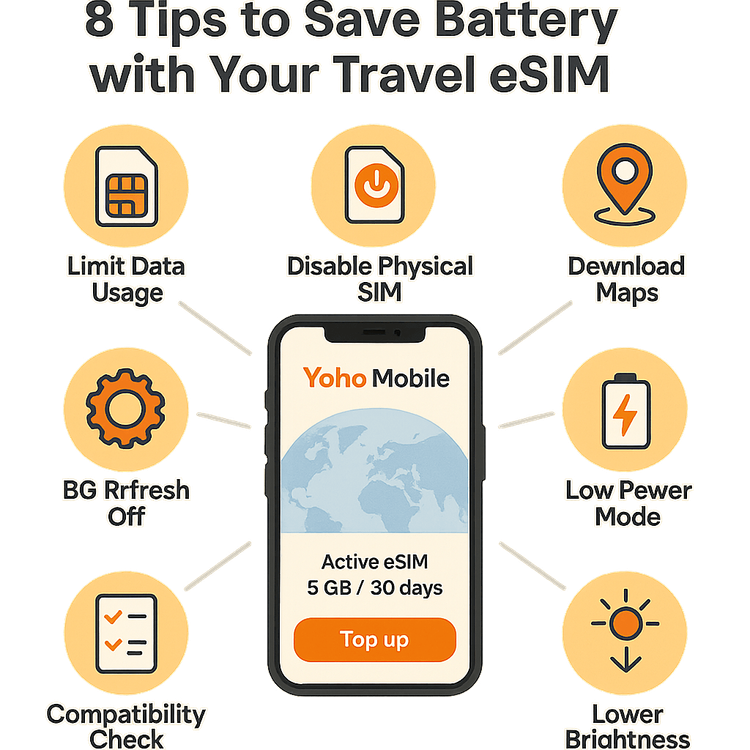
• Use airplane mode when you don’t need connectivity.
• Turn off Bluetooth, NFC, and Wi-Fi scanning when idle.
• Lower screen brightness and enable adaptive or dark mode.
• Limit video streaming and prefer audio when commuting.
• Close heavy apps or force-stop them if they misbehave.
• Use offline maps and download tickets and boarding passes ahead of time.
• Restrict background app refresh and push notifications for nonessential apps.
A few times, I crossed countries with no charger access. I set my phone to battery saver, turned on airplane mode, and the phone lasted long enough for navigation and emergency calls. That’s a real example of How to Save Battery Life While Traveling in a pinch.
Best devices and accessories to extend battery life
Choose gear that supports long days on the road.
• Power banks: choose 10,000–20,000 mAh for phones; 20,000–30,000 mAh for laptops. Prefer USB-C PD for fast charging.
• Wall chargers: compact chargers with 30W–65W output are ideal for phones and laptops.
• Battery cases: good for extra phone hours but add weight.
• Solar chargers: useful outdoors but slow and dependent on sun.
• Charging cables: carry spare certified cables; cheap cables can waste power or fail.
I use a 20,000 mAh USB-C PD power bank and a compact 45W charger. That combo charges my phone twice and my laptop once during long layovers. Selecting the right accessories is central to how to save battery life while traveling effectively.

Power management for common travel scenarios
Different situations need different tactics. Match your approach.
Airport layovers:
• Turn off push email and social fetch.
• Use airport Wi‑Fi for big downloads, then disconnect.
• Keep a power bank in carry-on.
Long train rides:
• Download movies and maps before boarding.
• Use airplane mode if no need for updates.
• Use Bluetooth headphones to save on speaker power.
Backpacking and remote travel:
• Use solar charger or power bank with a flashlight mode.
• Share location sparingly and rely on offline navigation.
• Conserve by scheduling device checks once every few hours.
These scenario-based steps helped me avoid dead devices while hiking in remote areas. They show how to save battery life while traveling without sacrificing safety or comfort.

Common mistakes to avoid
Steering clear of these errors saves time and power.
• Leaving unused radios on, such as Bluetooth or Wi‑Fi scanning.
• Using maximum brightness all the time.
• Relying only on streaming instead of downloaded content.
• Charging from unreliable public USB ports without a power bank.
• Ignoring battery health warnings or letting battery drain to zero repeatedly.
On a trip once, I charged from a public USB port and the charge was slow. Carry a quality charger and cable instead. Avoiding these mistakes is a big part of how to save battery life while traveling.

Monitoring and testing battery health
Keep tabs on battery performance and act early.
• Check battery health in settings to see capacity decline.
• Use built-in screen time and battery use tools to spot rogue apps.
• Run a quick test: fully charge, use typical apps for a set hour, and note percentage drop.
• Replace battery or get service if capacity is below recommended levels.
I track battery wear on my devices each season. When one phone showed rapid drain, replacing the battery restored usability. Regular checks are smart maintenance for how to save battery life while traveling.

Frequently Asked Questions of How to Save Battery Life While Traveling
How much does screen brightness affect battery life?
Higher screen brightness significantly increases power use, often being the single largest drain on phones. Lowering brightness or using adaptive/dark mode can add hours of runtime.
Is airplane mode the best quick fix to save battery?
Yes. Airplane mode cuts radio searches and background syncing, which preserves power fast. Use it when you don’t need connectivity.
What capacity power bank should I carry for travel?
For phones, 10,000–20,000 mAh is ideal; for laptops, 20,000–30,000 mAh or more. Match the bank’s output (USB-C PD) to your device for efficient charging.
Should I enable low-power mode always while traveling?
Low-power mode is helpful for extending battery life during travel, though it limits background tasks and visual effects. Use it when you need the extra hours or during flight and layovers.
Does cold or heat affect battery performance?
Yes. Extreme temperatures temporarily reduce usable battery capacity and can stress the battery long-term. Keep devices near body temperature when possible.
Conclusion
Saving power on the road is mostly about preparation and simple habits. Charge smart, pack the right gear, and use device settings to cut waste. Try one change per trip — like always enabling low-power mode or carrying a USB-C PD power bank — and you’ll notice longer runtimes and fewer emergencies. Practice these steps for How to Save Battery Life While Traveling and enjoy more time using your devices where it matters. Leave a comment with your best travel battery tip, subscribe for more travel tech advice, or test these tips on your next trip and share the results.